Platform notes
LearnDash: licenses, ownership, limits, and who should shortlist it
LearnDash is a WordPress LMS plugin with a low license cost and full ownership, in exchange for running hosting, updates, backups and payments yourself. Shortlist it if you have WordPress capability and want ownership and a low license fee, or want to sell seats inside your own site with the Elite license. Look elsewhere if you want a hosted service where the vendor handles operations, since with LearnDash you are your own support chain.

The WordPress LMS plugin: low license cost, full control, your ops
Choose LearnDash for
- Full ownership: your site, your data, your checkout
- Unlimited courses and learners on one yearly license
- Selling seats and managing groups with the Elite license
Look elsewhere if
- Anyone who does not want to run hosting, updates and backups
- Published SCORM support out of the box
- A hosted, supported experience with one throat to choke
Plans and pricing at a glance
| License | Price per year | Sites | Highlights |
|---|---|---|---|
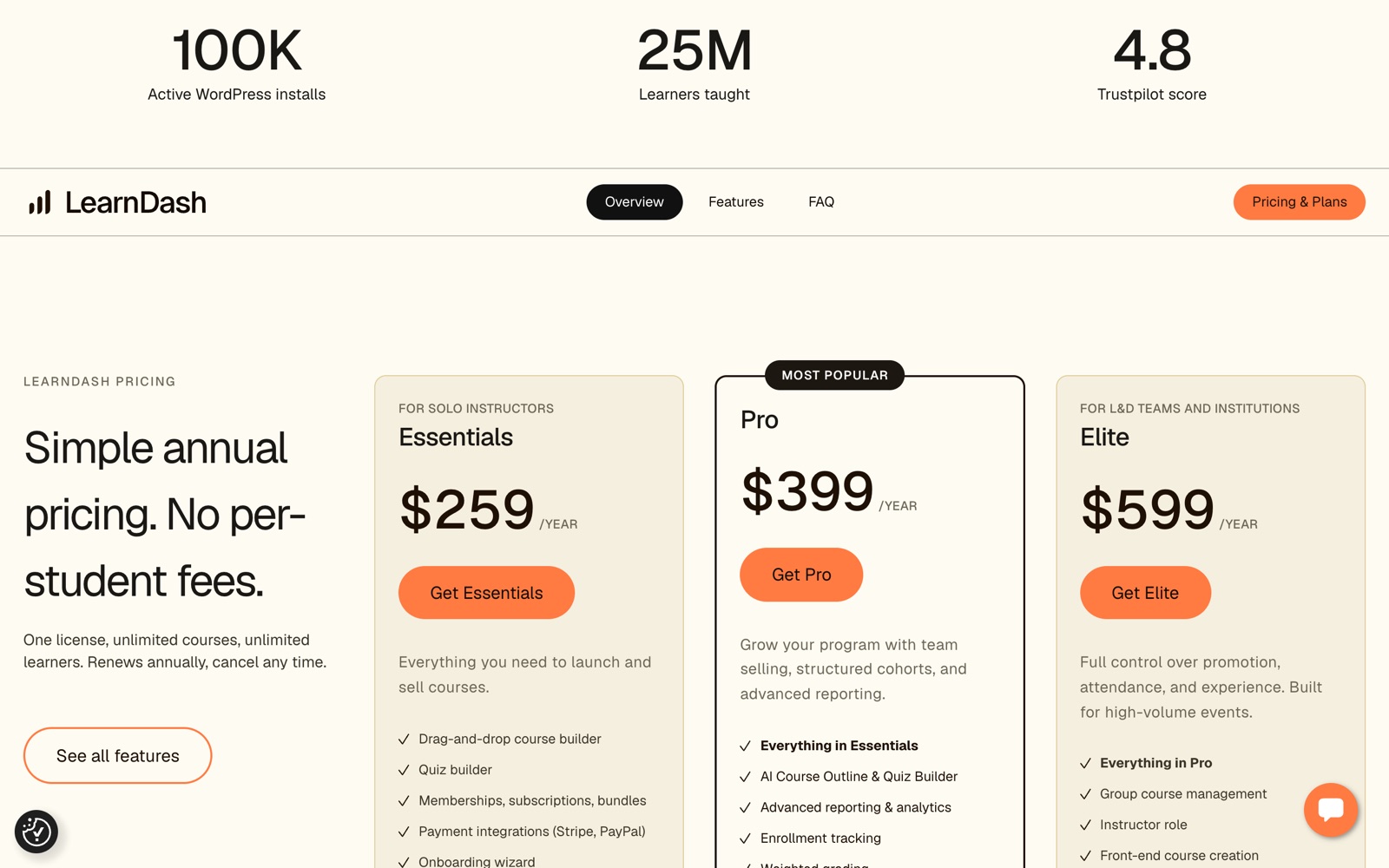
| Essentials | $259 | 1 | course and quiz builders; memberships and subscriptions; Stripe and PayPal; certificate builder |
| Pro | $399 | 1 | AI course outline and quiz builder; advanced reporting; enrollment tracking; custom report cards |
| Elite | $599 | 1 | group course management; sell seats; instructor role; multi-instructor management |
LearnDash is licensed as a yearly flat fee per site, not a subscription that scales with learners. Essentials is $259 per year, Pro $399, and Elite $599, each for one site with unlimited courses and learners, renewing annually. Because learners are unlimited, the upgrade drivers are features, not caps.
The main feature lever is B2B: group course management and seat selling require the Elite tier ($599 per year). Pro adds AI course and quiz building plus advanced reporting and enrollment tracking. So the tier you need is set by whether you sell seats and how much reporting you want.
The cost that the license does not show is operations. The license excludes hosting, maintenance and a page builder, so your real budget is the license plus your own WordPress running costs. Price both together in the LearnDash license comparison and the hosted vs WordPress guide.
Where it is strong
- Full ownership by construction. Your WordPress site is entirely your brand, and your data lives in your own install. There is no platform branding to remove and no vendor between you and your site.
- Low license cost, unlimited learners. Every tier covers unlimited courses and learners for one site, so a large audience does not raise the license price the way SaaS learner caps do.
- Seat selling on Elite. The Elite license ($599 per year) adds group course management, seat selling, an instructor role and multi-instructor management, letting you sell seats inside your own site.
- Certificates and builders from Essentials. A certificate builder, course and quiz builders, memberships, subscriptions and Stripe and PayPal are included from Essentials.
See hosted vs WordPress LMS for the trade-off in full.
Limits to price in before you commit
- License excludes hosting, maintenance and a page builder. The workaround is to budget those separately as recurring costs, not to assume the license is your total spend. Model the combined figure in the cost calculator, which adds a WordPress operations budget.
- Group selling requires Elite. If you sell seats, budget for the Elite tier at $599 per year; lower tiers do not include group management. If you would rather the vendor handle seat selling, compare Thinkific Grow.
- You are your own support chain. With a hosted platform the vendor operates the service; with LearnDash that is on you. If that is not viable, see LearnDash alternatives and the hosted options.
What is not published, and the self-hosting reality
Because LearnDash is a plugin on your own WordPress, some capabilities depend on your stack rather than a license feature, and the operational responsibility is yours.
- Self-hosting responsibility. Updates, backups and support are yours. The vendor ships the plugin, but keeping WordPress, the plugin and its dependencies current, backing up your data, and resolving incidents fall on you or your provider. Price this in before choosing LearnDash over a hosted platform.
- SSO. SSO depends on WordPress plugins you add and operate; it is not a LearnDash license feature. Confirm which plugin, protocol and cost you will run on the SSO checklist.
- SCORM. Native SCORM is not part of the published license grid. Third-party WordPress solutions exist and must be evaluated separately. See SCORM support by platform.
- Client separation. Separation across clients means separate WordPress installs and licenses; within one install, groups share the database. Plan one install per client if a client demands hard separation. See white label vs client portals.
Who should pick it, and who should look elsewhere
Pick LearnDash if you are:
- A team with WordPress capability that wants ownership and a low license cost, comfortable running your own hosting and updates.
- Selling seats inside your own site, using the Elite license for group management.
Look elsewhere if you are:
- After a hosted service where the vendor runs operations: Thinkific or LearnWorlds.
- Reliant on native SCORM or built-in SSO: LearnWorlds publishes accessible SCORM.
- A solo creator wanting the simplest setup with no WordPress: Podia or Teachable.
What it actually looks like
Check LearnDash against your own numbers
The WordPress LMS plugin: low license cost, full control, your ops. The only real test is your catalog and your buyers, in a trial or a demo.
Frequently asked questions
How much does LearnDash cost?
Which LearnDash license do I need to sell seats to companies?
Does LearnDash support SCORM and SSO out of the box?
Who handles updates and backups on LearnDash?
Keep deciding
LearnDash license comparison: Essentials vs Pro vs Elite
LearnDash yearly licenses at $259, $399 and $599 for one site, plus the real budget: hosting, maintenance and time. What needs the Elite tier.
Hosted LMS vs WordPress LMS: ownership and total cost
SaaS subscription versus a LearnDash license plus hosting, updates and backups. The yearly cost, the responsibility split, and who owns your data.
LearnDash alternatives, chosen by the reason you are leaving
Leaving LearnDash to avoid running WordPress, to get published SCORM, bundled payments or group selling? The best alternative per reason, with numbers.
White label LMS versus client portals: what is actually separate?
White label hides the platform's brand. A client portal separates catalog, users, admins and data per client. The matrix shows what each platform publishes.