Platform notes
Thinkific: plans, fees, limits, and who should shortlist it
Thinkific is a hosted course platform whose real strength is B2B group selling on its higher plans. Shortlist it if you sell training seats to companies, want invoicing without enterprise procurement, or are scaling a creator business past a first course. Look elsewhere if you need SCORM on a published plan, since Thinkific reserves SCORM for the quote-based Plus tier.

Hosted course platform with real B2B group selling on published plans
Choose Thinkific for
- Training companies selling seats and invoices to corporate clients
- Creators scaling past a first course with room to 10,000 students
- Keeping fees at zero by using Thinkific Payments
Look elsewhere if
- SCORM catalogs without an enterprise budget: SCORM lives on quote-based Plus
- Teams that need many admin seats cheaply (1/2/6 below Plus)
- Anyone set on their own Stripe account (surcharge below Plus)
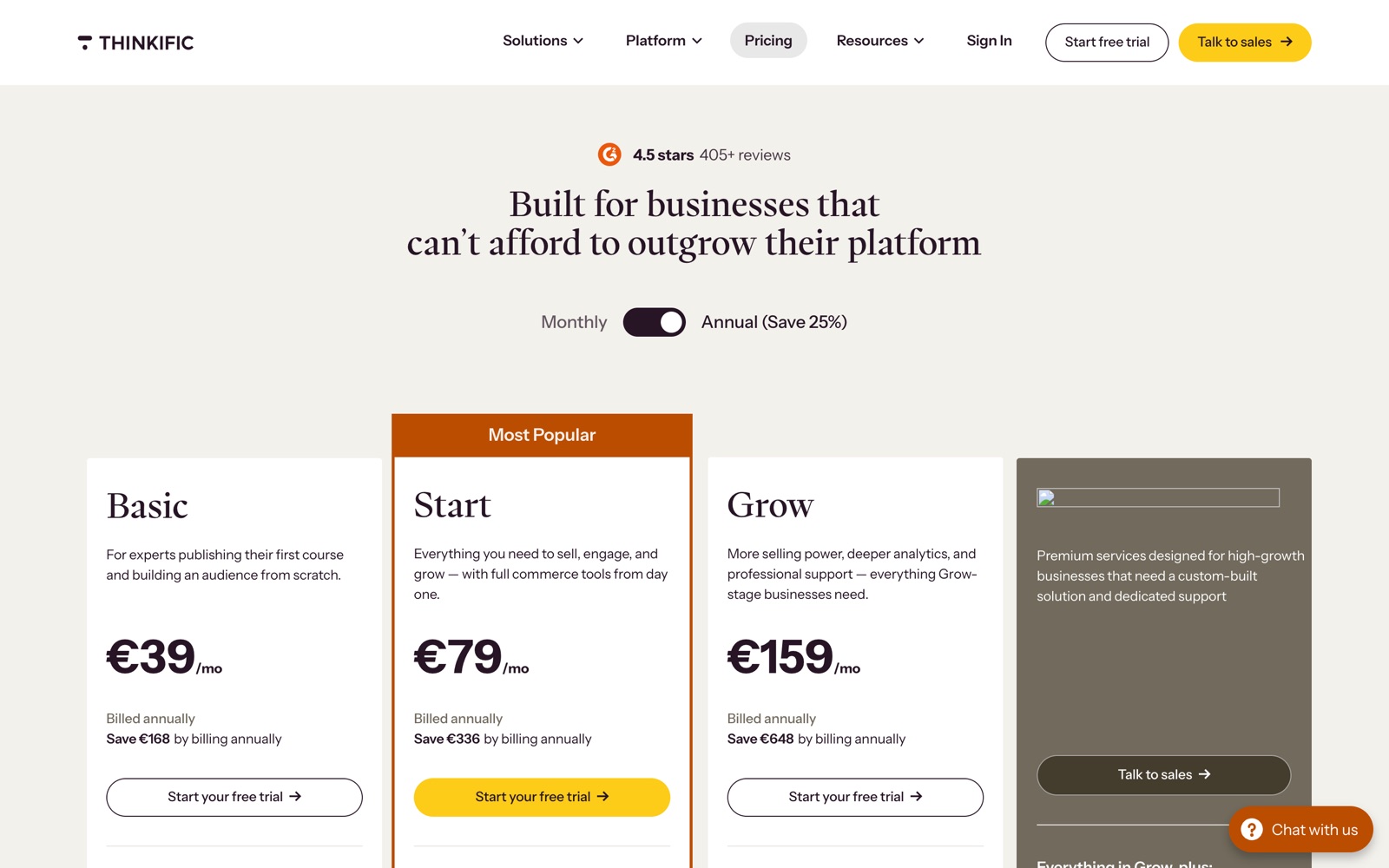
Plans and pricing at a glance
| Plan | Monthly billing | Annual billing | Admins | Fees | Highlights |
|---|---|---|---|---|---|
| Basic | $54/mo | $40/mo | 1 | 5% only if you use your own Stripe or PayPal | video lessons and quizzes; 1 community; custom domain |
| Start | $109/mo | $82/mo | 2 | 2% only if you use your own Stripe or PayPal | live sessions via Zoom; completion certificates; assignments and grading |
| Grow | $219/mo | $164/mo | 6 | 1% only if you use your own Stripe or PayPal | remove Thinkific branding; group and B2B selling; invoicing |
| Plus | Custom pricing | Custom pricing | custom | No platform fee | SCORM compliance; single sign-on (SSO); CRM integrations (HubSpot, Salesforce) |
Three levers force an upgrade on Thinkific, and none of them is the base price. The first is admin seats: Basic gives you 1, Start 2, Grow 6, and Plus is custom. A support team of three or four already pushes you to Grow at $164 per month on annual billing.
The second lever is the payment surcharge when you bring your own gateway. Using your own Stripe or PayPal instead of Thinkific Payments adds 5% on Basic, 2% on Start, 1% on Grow, and nothing on Plus. Thinkific Payments itself runs at standard processor rates of about 2.9% plus 30 cents. The surcharge is a reason to either use Thinkific Payments or climb plans.
The third lever is capability gating. SCORM, SSO, CRM integrations for HubSpot and Salesforce, and a branded mobile app all sit on Plus, which is quote-based. The published student ceiling below Plus is 10,000 current students, so a large catalog audience is itself a Plus conversation. See the full Thinkific plan comparison.
Where it is strong
- Selling B2B seats. Group and B2B selling plus invoicing are documented from the Grow plan ($164 per month on annual billing), which is the cleanest published path to selling seats to companies without an enterprise contract.
- Scaling past a first course. Unlimited courses on every plan, up to 6 admin seats on Grow, API access from Grow, and student engagement reports give a growing catalog room to operate.
- Invoicing without procurement. Invoicing lands on Grow, so you can bill a company by invoice rather than card without opening an enterprise negotiation.
- Brand removal mid-tier. Removing Thinkific branding starts on Grow, earlier than a full enterprise tier, though a branded mobile app is tied to Plus.
For the head-to-head reads, see Thinkific vs LearnWorlds and Thinkific vs Teachable.
Limits to price in before you commit
- SCORM requires Plus. SCORM import and delivery are listed on the quote-based Plus plan only. If your catalog is SCORM based, either budget for a Plus quote or look at LearnWorlds, which opens 20 SCORM uploads on Pro Trainer. The SCORM comparison works through the split.
- Own-gateway surcharge. Bringing your own Stripe or PayPal adds 5% on Basic, 2% on Start, 1% on Grow. The workaround is to use Thinkific Payments at processor rates, or to climb to Grow or Plus where the surcharge shrinks or disappears. See how fees really add up.
- 10,000 student cap below Plus. Every plan under Plus caps at 10,000 current students. A large or fast-growing audience pushes you into custom Plus pricing. Model it in the cost calculator before you commit.
Weighing a switch or a rival? See the Thinkific alternatives page.
What is not published
Two B2B dimensions are not documented publicly and should be pinned down in a demo, in writing, before you rely on them.
- Delegated client-admin rights below Plus. Whether a client manager can run their own people without touching your other clients is not published below Plus. Ask the vendor to show a client manager account on your target plan and confirm exactly what it can see and edit.
- Per-client data separation. Thinkific makes no public commitment about separating data per client. Communities and group selling live inside one school. Test the multi-account scenario with fictional accounts in two client groups trying to reach each other's data, and get the answer in writing before using words like isolation.
- SSO protocols. SSO is listed on Plus, but the protocols and setup terms are a demo conversation. Ask which protocols are supported in writing on the SSO and client access checklist.
Who should pick it, and who should look elsewhere
Pick Thinkific if you are:
- A training company selling B2B seats that wants invoicing and group selling on a published plan (Grow).
- An established course business scaling past a first course, needing several admin seats and API access.
Look elsewhere if you are:
- A training provider that needs SCORM on a published plan: start with LearnWorlds.
- A team that wants full ownership and the lowest license cost: compare LearnDash and read hosted vs WordPress.
- A solo creator with a small catalog and simple needs: Podia or Teachable may be simpler.
What it actually looks like
Check Thinkific against your own numbers
Hosted course platform with real B2B group selling on published plans. The only real test is your catalog and your buyers, in a trial or a demo.
Frequently asked questions
Which Thinkific plan includes SCORM?
How much does Thinkific cost per year?
What is the extra fee for using my own Stripe on Thinkific?
Can Thinkific give each corporate client a separate space?
How many admin seats does each Thinkific plan include?
Keep deciding
Thinkific plan comparison: Basic vs Start vs Grow vs Plus
What forces each Thinkific upgrade: admin seats, group selling, branding removal, API and SCORM. Prices, fees and caps per plan, with the math.
Thinkific vs LearnWorlds: the answer depends on three things
SCORM, client groups, learner caps and price compared. LearnWorlds for SCORM, Thinkific for a big learner base on a budget. See the split.
Thinkific alternatives, chosen by the reason you are leaving
Leaving Thinkific over SCORM, the 10,000 student cap, gateway surcharges or admin seats? The best alternative per reason, with exact numbers.
LearnWorlds vs Thinkific for SCORM courses
LearnWorlds sells SCORM uploads self-serve from Pro Trainer; Thinkific gates SCORM to quote-based Plus. What is published, and the test protocol to run yourself.